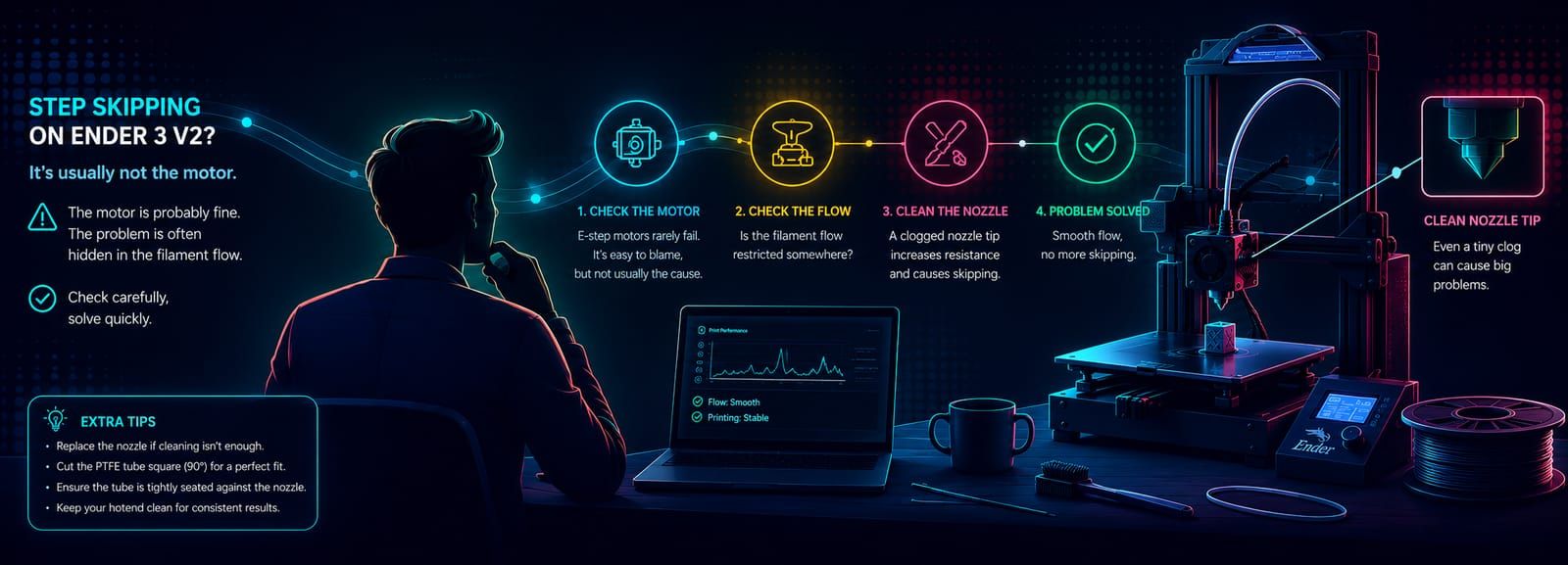
🖨️💡 Stepper Motors Don't Break, Filament Clogs: A 3D Printing Lesson
My Ender3-V2 started skipping steps even though filament was still flowing. I feared the motor had failed, but the real culprit was an invisible partial clog at the nozzle tip. A story of troubleshooting, learning, and why smooth filament flow is everything.
It was past midnight. The familiar, calm hum of my printer filled the room as the print had been running smoothly for hours. Then suddenly, that sound came: click... click... click. A sound every maker knows, and every maker dreads. My heart sank. "Not again?" I thought. But this time, before panicking, I stopped, thought, and did some research. Here's what I learned that night—maybe one day it will help you too.
In short: My Ender3-V2 started skipping steps even though filament was still flowing. The culprit wasn't the motor—it was a partial clog at the nozzle tip, invisible to the eye but felt by the motor. A 30-second cleaning with a needle fixed it.
After two months of flawless printing, my Ender3-V2 started making that dreaded sound again: skipping steps. That harsh "click" coming from an otherwise silent machine felt like a needle stabbing straight into my heart. My first reaction was pure despair: "Oh no, did the motor fail again?"
But this time, something was different. I had learned from my past mistakes. Instead of panicking and immediately ordering spare parts, I decided to take a breath and do some thorough research first.
The very first and most important truth I discovered while diving into the vast sea of online knowledge was this: E-Step motors rarely ever fail. That sentence lit a lightbulb in my mind. If the motor was healthy, the problem had to lie somewhere in the mechanical assembly or in something I had done. Besides, I had assembled my extruder with great care: the spring tension was gentle enough not to crush the filament, yet firm enough to grip and push it securely. I trusted that careful adjustment. The issue wasn't there either.
Later, during a conversation with an AI assistant, the matter became clear. The problem was in the filament's flow path. Right at that moment, a memory from the printer's early years flashed in my mind. I'm sure it has happened to many of you: the motor runs, the gears turn, the extruder wheels spin endlessly, but not a single gram of filament comes out of the nozzle. Back then, the solution was simple—I would take a needle, gently clean the nozzle tip, and the filament would magically start flowing again.
To be honest, ever since I switched to a metal extruder, this skipping issue has been popping up from time to time.
Here's the tricky part: the filament was still coming out of the nozzle. The print looked fine to the naked eye. There was no obvious blockage, no missing layers, nothing visibly wrong. But that's exactly what makes this kind of clog so deceptive—a partial clog doesn't stop the flow, it just restricts it. The nozzle wasn't fully blocked; it was just narrowed enough to make pushing the filament through harder than the motor could comfortably handle. When the resistance got too high, the motor would lose its grip for a split second and skip a step. That's where the "click" comes from. You can't see this kind of clog—you can only hear it.
Connecting the past with the present, I thought: if a tiny clog at the nozzle tip is making the flow difficult, the motor would fail to push through and start skipping steps. I immediately grabbed a cleaning needle and carefully poked the nozzle tip.
And the result: with a single move, the problem completely vanished. That irritating "click" sound from the motor stopped, and the filament began flowing smoothly again. So that was the whole story—just this tiny thing.
The most critical lesson I've drawn from this experience is this: Just because the filament is flowing doesn't mean everything is fine. You must be sure that the flow is smooth and stable. If I end up having to clean it more frequently in the future, I'm ready to tackle the issue more thoroughly. My next steps are clear: replace the nozzle entirely and deal with the end of the PTFE (Teflon) tube in the hot zone. I know that the part of the tube touching the hot nozzle deforms over time and disrupts the flow. At that point, I'll need to recut the tube properly. And of course, the golden rule of this procedure: cut the tube at an exact 90-degree angle, leaving a perfectly flat, clean surface.
Learning and gaining experience truly never ends. The problems that seem like the biggest failures can sometimes have the simplest solutions. We just need to pause, think, and listen to our machines.